SCORM Packager (HTML → SCORM 2004)
Turn HTML or mobile-learning exports into SCORM 2004/1.2 packages, and validate any SCORM zip.
scorm-mcp-server
Turn self-contained HTML, a Claude Design
.dcbundle or a mobile-learning platform content export (Excel activity templates + media) into a SCORM 2004 (or 1.2) package ready to import into any LMS — assets inlined for 100% offline, completion / progress / score tracking injected, ADL schemas bundled.







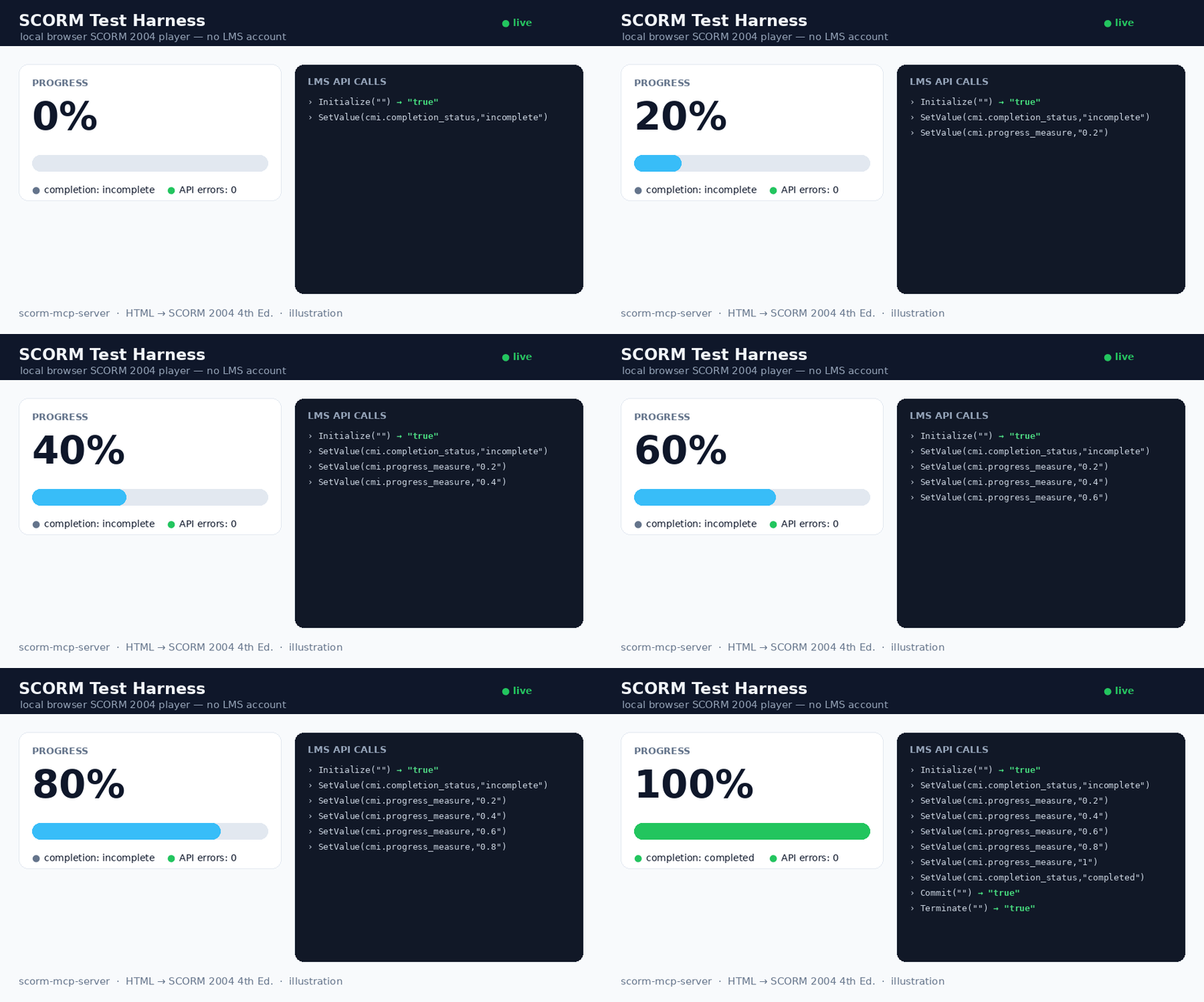
The bundled local harness (scorm-test-harness.html) playing a package: progress 0 → 100%, completion, and the live LMS API-call log (0 errors). Illustration.
An MCP server exposing three tools: scorm_package converts a finished HTML learning module into a .zip (PIF) any SCORM-compliant LMS can import, scorm_validate checks any existing SCORM zip (made by any tool) and explains exactly why an LMS would reject it, and scorm_selftest is a 1-second health check.
Principle: WRAP, don't rewrite. Your HTML is preserved; the tool only:
- Inlines every asset (CSS,
@import, fonts, JS, images,srcset, favicons) as data URIs → runs 100% offline. - Injects a small runtime that reports completion, progress (%) and time spent, with resume across sessions.
- Generates the manifest and bundles the 15 official ADL XSD schemas — the manifest is validated against them (real conformance, not just "well-formed").
✅ Status — validated on a real LMS
- 325/325 automated checks green: 23 converter · 15 runtime · 15 MCP · 1 schema conformance (
xmllint) · 6 security · 11 features · 13 auto-milestones · 21 V2 (bundle /.dc/ score) · 10 output-dir · 9 tracking-signal · 32 hardening · 29 SCORM 1.2 · 12 CLI/batch · 16 web UI · 44 mobile-learning migration · 35 package validation · 33 question-level interactions — plus 6 bonus strict-runtime checks (scorm-again). - SCORM Cloud (real LMS): imports cleanly (recognized as SCORM 2004 4th Ed., "manifest looks great"), and the dashboard reports completion = complete, success = passed, time tracked.
Input formats
Input (input_path or html) | Handling |
|---|---|
A single self-contained .html (e.g. Claude Design "standalone HTML" export) | assets inlined, runtime injected — v1 path |
A folder or .zip (multi-file module) | whole tree preserved; entry HTML inlined; manifest lists every file |
A Claude Design .dc bundle (*.dc.html + support.js + _ds/) | auto-detected; CDN libs (React/Babel…) vendored offline via window.__resources (no source patch); runtime injected before support.js |
A mobile-learning platform content export (Excel activity templates + media/) | auto-detected; an interactive HTML course is rebuilt from the templates — info / transition / flash cards, quiz questions, media codes ([media:…], [H1:…], [quote:…], !!), scored quizzes reporting cmi.score — then packaged. Course title derived from the template names; with --batch, a whole catalogue migrates in one run |
Pass a .dc bundle as its folder or .zip (not the lone .dc.html, which is inert without its siblings).
Scores & quizzes (optional)
Set mastery_score (0..1) to enable score-based success and add sequencing objectives to the manifest. Report the score from your content in one line — no SCORM knowledge required:
window.SCORM2004.score(8, 0, 10);                                   // raw, min, max
window.dispatchEvent(new CustomEvent("scorm:score",    { detail: { raw: 8, min: 0, max: 10 } }));
window.dispatchEvent(new CustomEvent("scorm:progress", { detail: 0.5 }));  // 0..1
window.dispatchEvent(new CustomEvent("scorm:complete"));
The runtime maps these to cmi.score.*, sets success_status = passed/failed against mastery_score, and reports completion/progress. (dc:* event names are accepted as aliases.)
Question-level tracking (v2.3) — report each answer as a cmi.interactions record, so the LMS gradebook shows which questions were missed, not just the total:
window.SCORM2004.interaction({
  id: "quiz1-q3", type: "choice",
  description: "Which colour is the brand?",
  learnerResponse: "Blue", correctResponse: "Red",
  result: false, latencyMs: 12000,
});
// or, without touching the API:
window.dispatchEvent(new CustomEvent("scorm:interaction", { detail: { id: "q3", result: true } }));
Dialect-aware (2004 learner_response/timestamp vs 1.2 student_response/time, incorrect vs wrong) and best-effort by design: an LMS that refuses interaction writes gets a logged warning and the session carries on. Quizzes generated by the mobile-learning migration report their interactions automatically — one record per question, with the question text, the learner's answer, the expected answer and the latency.
SCORM 1.2, batch mode, CLI (v2.1)
SCORM 1.2 — pass scorm_version: "1.2" and you get a 1.2 manifest (validated
against the bundled 1.2 XSDs, with adlcp:masteryscore when mastery_score is
set). The injected runtime is adaptive: it speaks to whichever API the hosting
LMS exposes (API_1484_11 or API), maps the data model (single
lesson_status, 0-100 score, HH:MM:SS session time, 4096-char suspend data)
and never downgrades a passed status.
Batch — batch: true treats input_path as a directory of courses (each
sub-directory, .zip or .html = one course). One package per course, one
consolidated batch-report.json, and a broken course never sinks the others.
CLI — no MCP client required:
npx -y scorm-mcp-server ui            # local drag & drop web UI
npx -y scorm-mcp-server pack course.html --title "My course"
npx -y scorm-mcp-server pack ./courses --batch --scorm-version 1.2
npx -y scorm-mcp-server validate pkg.zip   # conformance-check an existing package
npx -y scorm-mcp-server selftest      # 1-second health check
Web UI — ui opens a localhost page: drop an .html or .zip, pick the SCORM
edition and an optional pass mark, download the package. Runs entirely on your
machine; nothing is uploaded anywhere.
Library — buildPackage() is a public API for pipelines and SaaS backends:
import { buildPackage } from "scorm-mcp-server";
const r = await buildPackage({ html, title: "My course", scormVersion: "1.2", masteryScore: 0.6 });
// r.zip (Buffer) · r.fileName · r.warnings · r.milestoneIds …
Diagnostic — the scorm_selftest MCP tool packages a constant built-in HTML
and reports version, duration and output path: it separates "server broken"
from "input problem" in one second.
Validate any SCORM package (v2.3)
"Why does my LMS reject this zip?" — scorm_validate answers it for any SCORM package, not only those produced here, and the input is never modified:
npx -y scorm-mcp-server validate course.zip          # human-readable report
npx -y scorm-mcp-server validate course.zip --json   # machine-readable
Checks: zip readability, imsmanifest.xml at the ROOT (detects the classic "zipped the folder instead of its contents" mistake and says how to fix it), well-formed manifest, SCORM edition detection (2004/1.2), launchable organization/item/resource chain, launch file and every <file href> present in the archive (case-only mismatches flagged — they work on Windows and fail on Linux LMS servers), and full XSD validation against the official ADL schemas — using the package's own XSDs first and falling back to the embedded copies, so packages that ship without schemas validate too. Exit code 0/1 for CI pipelines; also exposed as the scorm_validate MCP tool and the validatePackage() library API.
Install
Option 0 — try it online, no install
https://scormpackager.vercel.app — drop a course, pick the SCORM edition, download the package. Files are processed in memory and never stored, but they do travel to a server; for real work use the local options below, where nothing leaves your machine (and there is no 4 MB limit).
Option A — one-click (recommended)
Download scorm-mcp-server-x.y.z.mcpb from the Releases, then in Claude Desktop → Settings → Extensions, drag-drop the .mcpb, pick an output folder, and enable it.
Option B — npm (any MCP client)
No install step: add this to your client's MCP config (~/Library/Application Support/Claude/claude_desktop_config.json for Claude Desktop):
{
  "mcpServers": {
    "scorm": {
      "command": "npx",
      "args": ["-y", "scorm-mcp-server"],
      "env": { "SCORM_OUTPUT_DIR": "/ABSOLUTE/PATH/scorm-packages" }
    }
  }
}
Registry name: io.github.giacomomaria81/scorm-mcp-server (MCP registry).
Option C — from source (developer)
git clone <this-repo> && cd scorm-mcp-server
npm install        # dist/ is prebuilt; npm run build is optional
Then point the config at node /ABSOLUTE/PATH/scorm-mcp-server/dist/index.js.
Restart Claude. The scorm_package tool is now available.
Usage
In a conversation: build your module with Claude Design, then say "package this module as SCORM." Claude calls scorm_package and returns the path to the .zip.
Progress & completion — it just works
You don't have to prepare anything: if your HTML declares no milestone, the packager auto-generates them from the document structure (sections → articles → headings, capped at 8, trigger view). Plain HTML gets meaningful progress out of the box. Disable with auto_milestones: false. Want success_status = passed on completion without touching the HTML? Pass success_on_completion: true.
Declarative milestones (recommended for fine control)
Mark the meaningful steps directly in your HTML — explicit milestones always take precedence over auto-generation. The runtime computes progress_measure = milestones_reached / total, and sets completion_status = "completed" once all are reached.
| Attribute | Effect |
|---|---|
data-jalon="unique-id" | declares a milestone |
data-trigger="view" | reached when scrolled into view (default) |
data-trigger="click" | reached on click |
data-trigger="ended" | reached when a video/audio ends |
<section data-jalon="intro"       data-trigger="view">…</section>
<button  data-jalon="read-pitch"  data-trigger="click">I read it</button>
Recommended: 4–8 milestones per micro-module. Resume is automatic (cmi.suspend_data + cmi.location); progress never regresses.
Programmatic milestones — window.SCORM2004.reach("quiz-passed") works even if the id has no data-jalon element: unknown ids are declared on the fly and count in the total. To register one before it's reached (accurate denominator), use window.SCORM2004.declare("quiz-passed") early. Both survive resume.
Success status (opt-in) — add data-scorm-success="on-completion" on any element (e.g. <body>) and the runtime also sets cmi.success_status="passed" when the module completes. Without it, success_status is never written.
Language — the tool's language (BCP-47, default fr-FR) is applied as <html lang="…"> when the source HTML doesn't declare one.
Security — asset references are confined to the module folder: ../ or absolute paths outside it are never inlined (a warning is emitted instead).
Test it without an LMS account
Open scorm-test-harness.html via a tiny local server and drop a generated .zip into it:
python3 -m http.server 8000 # then open http://localhost:8000/scorm-test-harness.html
You'll see live progress %, completion, and the full log of LMS API calls (0 errors expected).
Build & test
npm install
npm run build     # tsc -> dist/
npm test          # 325 checks across 17 suites (xmllint required for the schema tests)

# bonus: validate against a strict independent SCORM 2004 runtime
npm i -D scorm-again && node test/scorm-again.test.mjs
Requirements: Node ≥ 20, and xmllint (libxml2-utils) for the schema test.
Project structure
src/        index.ts (MCP server + CLI) · converter.ts (inlining + manifest + zip) · runtime.ts (injected SCORM runtime) · validate.ts (package conformance checker) · tom.ts (mobile-learning migration) · ui.ts (local web UI)
dist/       compiled output (shipped)
schemas/    15 ADL XSD (SCORM 2004 4th Ed.) + schemas12/ (4 XSD SCORM 1.2), bundled into every package
test/       17 suites (converter / runtime / mcp / schema / validation / interactions / migration…) + fixtures
ARCHITECTURE.md           design decisions, data flow, testing strategy
scorm-test-harness.html   local browser SCORM player (fake LMS, no account)
manifest.json             MCPB manifest (for building the .mcpb desktop extension)
Privacy Policy
This extension runs entirely locally: no data collection, no telemetry, no third parties. The only network activity is downloading assets that your own HTML references, to embed them into the offline package. Full policy: PRIVACY.md.
License
Installation
Source-derived launch command. Check the maintainer’s required arguments and credentials before running:
npx -y scorm-mcp-serverSet up in your AI client
Merge this template into ~/Library/Application Support/Claude/claude_desktop_config.json. Keep existing servers. Add any arguments, credentials, and permissions required by the maintainer; this template has not been install-tested.
{
  "mcpServers": {
    "io-github-giacomomaria81-scorm-mcp-server": {
      "command": "npx",
      "args": [
        "-y",
        "scorm-mcp-server"
      ]
    }
  }
}
Restart Claude Desktop completely for changes to take effect. Confirm the server appears connected in the client’s tool list, then try a read-only example from its documentation.
Claude Desktop setup referencePackage
Compatible MCP Clients
SCORM Packager (HTML → SCORM 2004) works with any MCP-compatible client. Copy the config snippet from the Configuration section above and add it to the file shown for your client, then restart the application.
- Claude Desktop
~/Library/Application Support/Claude/claude_desktop_config.jsonRestart Claude Desktop completely for changes to take effect. - Cursor
~/.cursor/mcp.jsonRestart Cursor for changes to take effect. - VS Code
.vscode/mcp.jsonReload VS Code window for changes to take effect. - Windsurf
~/.codeium/windsurf/mcp_config.jsonRestart Windsurf for changes to take effect. - Claude Code
.mcp.jsonSave at the project root, then start Claude Code in that project and review the MCP server approval prompt. Keep real credentials out of shared files.