jevnav
Replayable browser automation: Jev picks the element, a gate blocks risky actions, every run traces.
jevnav
Page truth for browser agents — and decisions that replay, test and audit.






https://github.com/user-attachments/assets/502550ec-77d4-439e-b334-fe7007f946b9
jevnav is a browser layer for agents and tests. It reads a page as facts
(structure, computed styles, the controls on screen), lets
Jev — TypeSafe's model for structured
questions — pick the element for an intent with a calibrated probability,
gates risky or uncertain actions to a human, and records every decision in a
trace that replay re-checks offline in CI.
- Page truth, not pixels.
outline,stylesanddiffreturn what the browser resolved —font-size 32px → 28pxbetween a mockup and the running app is something an agent can fix. No screenshots in the decision loop. - Evidence, not confidence. Each decision carries its probability, the gate
verdict and its cost. A site change that breaks a recorded decision makes
replayexit 1 — no model call, no API key. - Works where your agent works. CLI, Python/pytest, an MCP server for Claude Code, Cursor, Codex and friends, and a GitHub Action.
Why it exists — selector tests break when a label changes; LLM browser agents
are confident, unauditable and occasionally wrong: docs/why.md.
Install
uv tool install jevnav          # or: pip install jevnav  (the MCP server is included)
playwright install chromium     # one-time browser download
Requires Python 3.10+. Deciding (go, run, browse, goal) needs a TypeSafe
API key in TYPESAFE_API_KEY or ~/.config/typesafe/apikey.txt. replay,
diff, outline and styles need no key — that is the point.
Quickstart
1. Let Jev drive — state a goal and the outcome that proves it:
jevnav go --goal "sign in with the demo account and open the pricing page" \
  --start https://app.example.com/login \
  --context email=demo@example.com --context password="${ACME_PASSWORD}" \
  --success "#pricing.visible" \
  --report goal.md
status: done — outcome verified against the page
steps: 5 — auto 4, review 0, blocked 0
One Jev request per step; every step is gated and traced. The loop stops when
the goal is met, when nothing on the page can make progress (stuck), when the
gate wants a human (review), when the page stops changing (no_progress), or
at --max-steps. done is a claim — --success turns it into evidence
(verified, or unverified and the run fails). --dry-run decides without
acting.
2. Or script the flow and let Jev resolve each intent:
# flows/acme-login/flow.yaml
id: acme-login
start: https://app.example.com/login
steps:
  - intent: "Sign in to the existing account"
    action: click
  - intent: "Type the password"
    action: fill
    value: "${ACME_PASSWORD}"   # read from the environment, never written to the trace
  - intent: "Submit the login form"
    action: click
jevnav run flows/acme-login/flow.yaml --report run.md
3. Replay it in CI — offline, deterministic, no key:
jevnav replay acme-login.trace.jsonl            # re-resolve every recorded decision
jevnav replay acme-login.trace.jsonl --execute  # also re-run the actions + check --success
steps 3 verdicts: ok 3
Change Sign in to Log in on the site and the same replay fails:
[01] changed   Sign in to the existing account
      no element now has 'button|sign in' (was 'Sign in' / 'button')
Exit code 1, with the reason. That is the regression test.
Page truth for your agent
The facts a coding agent needs about a rendered page, without a screenshot:
outline(selector) for a region's structure (tags, headings, text, boxes),
styles(selector, props) for the computed values, page_state() for the
controls jevnav can act on.
jevnav diff compares a mockup with the running app as facts and exits 1 on
drift:
jevnav diff new-ui.html http://localhost:3000 --report ui-diff.md
| element | property | mockup | app |
|---|---|---|---|
| h1 [Pricing] | font-size | 32px | 28px |
| button#cta [Start free] | border-radius | 8px | 4px |
The report also lists structure differences (missing, new and moved elements;
boxes compared with a 4px --tolerance). The loop for "here is a new UI, update
the codebase": the agent reads both pages with jevnav, edits the code itself,
re-runs diff until it exits 0, then pins the outcome with
goal(..., success="<selector>") so replay --execute keeps checking it.
jevnav reports; it never edits your repository and never compares pixels.
Gates
Every decision gets one of three verdicts:
| verdict | meaning |
|---|---|
auto | confidence at or above the threshold and nothing risky — the action runs |
review | a human confirms first: low p, a risky intent, or a truncated candidate list |
blocked | no decision was possible (the model answered none, or the call failed) |
review and blocked never execute. Thresholds and risky patterns live in an
optional gates.yaml; defaults ship for nine languages:
# flows/acme-login/gates.yaml
min_confidence: 0.9        # scripted flows: one question per step, well calibrated
loop_min_confidence: 0.5   # goal loop: four questions at once, p runs lower
risky:
  - "\\b(delete|remove|purchase|pay)\\b"   # matched against intent + element name + role
intents:
  "delete the *": { min_confidence: 0.99 }
truncated: review          # the page had more than 255 candidates
The goal loop uses a lower threshold on purpose: measured correct loop decisions
land at p 0.41–0.99 and wrong ones at 0.39–0.47, so its safety comes from
deterministic checks instead — fill on a button is refused, a field with no
context value is blocked, two steps that change nothing stop the run, risky
patterns always go to review, and the outcome is verified against --success.
MCP server
claude mcp add --scope user jevnav -- uvx jevnav mcp
Or, for Cursor, Claude Desktop, VS Code and other clients:
{
  "mcpServers": {
    "jevnav": {
      "command": "uvx",
      "args": ["jevnav", "mcp"],
      "env": { "TYPESAFE_API_KEY": "..." }
    }
  }
}
No URL or flags needed: the agent opens pages with goto, one server serves
every site, and each session writes an auditable jevnav-session.trace.jsonl
(--no-trace opts out). The deciding tools are what no other browser MCP has:
| tool | what it does |
|---|---|
browse(intent, action, value, min_confidence) | one step: Jev picks the element, the gate decides, only auto acts |
goal(goal, context_json, max_steps, success) | drive the whole way; returns done / stuck / review plus the verification |
goto(url) · page_state() · summary() | open a page, list what jevnav can act on, session totals |
Plus 28 acting and inspecting tools (forms, keys, uploads, tabs, console,
network, styles, outline, emulation, tracing, Lighthouse), each with MCP
annotations so the host knows which calls change state. A decision costs about
$0.00004 and ~330ms, and the page never enters the LLM's context. Full tool
reference, security flags and when to pick jevnav vs. Playwright or
chrome-devtools-mcp: docs/mcp.md.
CI — GitHub Action
- uses: dtduc-git/jevnav@v0
  with:
    trace: examples/local-demo/demo.trace.jsonl
    execute: "true"          # also re-run the recorded actions
    report: replay.md
No model call, no API key, ~30 seconds. Fails when a recorded target changed,
became ambiguous, or a recorded --success selector is no longer visible.
Inputs: trace, report, execute, json, version (default latest from
PyPI, or local for a checkout). @v0 floats; pin a release tag such as
@v0.2.2 for fully reproducible CI.
pytest
The jev fixture ships with the package: an ordinary Playwright test gets Jev
decisions, and every test writes a trace that replays in CI.
def test_sign_in(jev):
    jev.goto("https://app.example.com/login")
    jev.fill("the email address", "demo@example.com")
    jev.fill("the password field", "${DEMO_PASSWORD}")
    jev.click("the sign-in button")
    jev.expect("#welcome")
DEMO_PASSWORD=... pytest --jev-trace-dir=traces
DEMO_PASSWORD=... jevnav replay --execute traces/test_sign_in.trace.jsonl   # offline, no key
A review verdict fails the test before the action runs, ${VAR} values are
recorded by name only, and jev.page is the real Playwright page for everything
else. Runnable example with a committed trace:
examples/pytest-interop/.
Your own browser
jevnav go --goal "..."                                          # fresh headless Chromium (default)
jevnav go --goal "..." --user-data-dir ~/.cache/jevnav-profile --headed   # persistent profile
jevnav go --goal "..." --cdp http://127.0.0.1:9222              # attach to a running Chrome
Log in once with --headed and every later run reuses the profile; --cdp
drives the Chrome you already have open, keeps its own settings (so it refuses
--user-data-dir, --locale, --timezone and --user-agent) and never
closes it. Both work on run,
go, replay and mcp, and so does --browser for firefox or webkit (plus
--locale, --timezone, --user-agent). Profile paths and cookies never reach
a trace.
Evidence
| what | result | source |
|---|---|---|
element picks on real sites (9 sites, jev-1.13.0) | 41/41 scored cases correct; 30/30 at the p ≥ 0.9 gate | research/browser-element-selection.md |
| decision latency and cost | p50 365ms, $0.000153 per decision | same |
| goal loop (local fixture, 4 goals × 2 wordings) | 8/8 goals correct, incl. the impossible one (stuck) | docs/evidence.md |
| driving tasks vs. chrome-devtools-mcp (same LLM, n=2) | jevnav 8/8, chrome-devtools-mcp 6/8; chrome-devtools 2.4× faster end to end | research/driving-benchmark.md |
| replay | deterministic: offline, no key, exit 1 on a broken decision | run it on your own traces |
Small samples with a single annotator: read them as direction, not proof.
jevnav's advantage is decision cost and evidence, not wall-clock speed on small
pages. Method, caveats and the tool-level comparison:
docs/evidence.md.
How it works
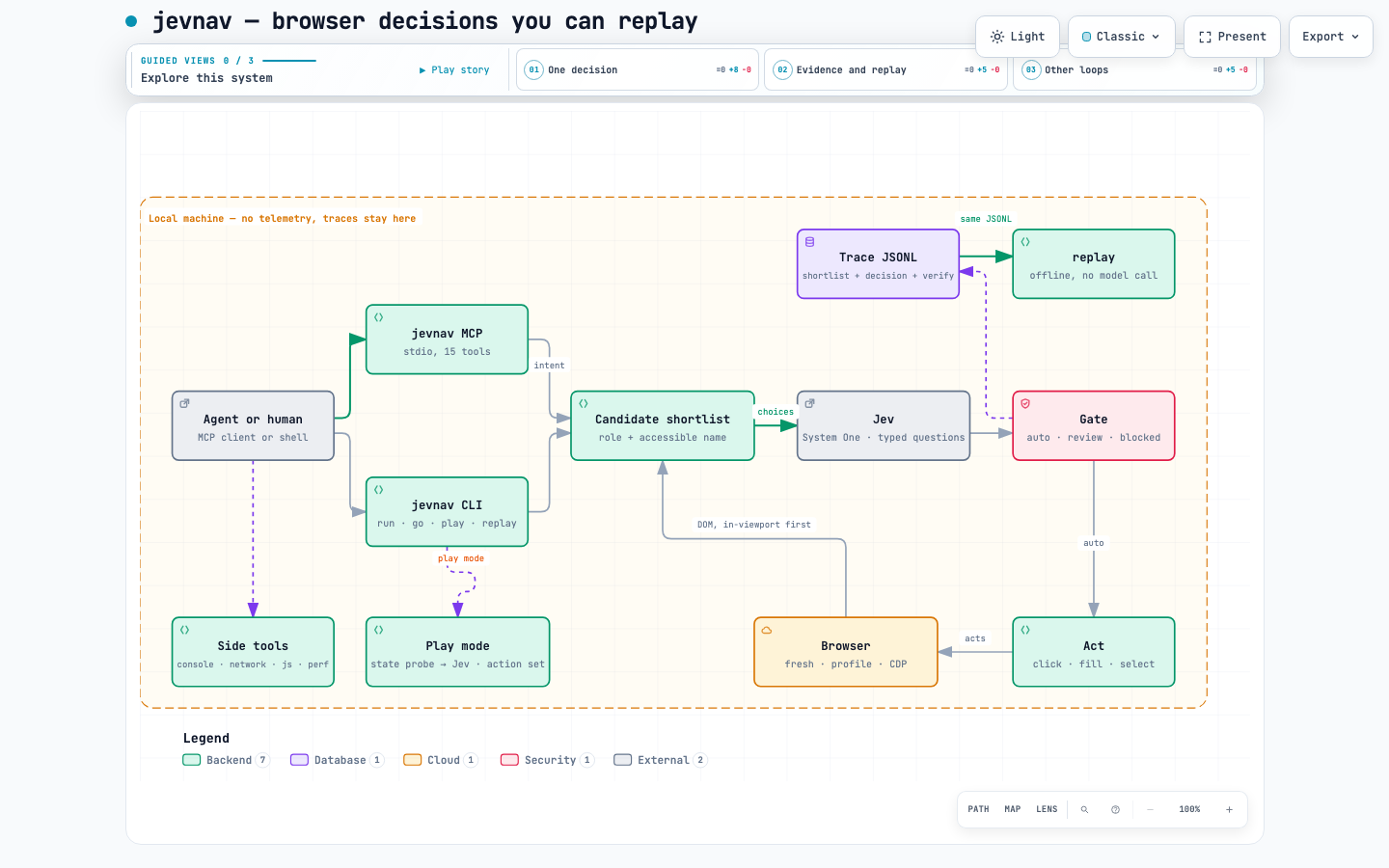
- A shortlist, not the page. Visible interactive elements from every frame
and open shadow root, ranked by how likely a human would act on them and
capped at 120 (
--max-candidates, hard cap 254). Each carries role, accessible name, type, href, placeholder and a scope, so three "Email" fields stay distinguishable. - One question per step. The shortlist plus
nonebecomes a choice question; Jev answers with one element and its probability. - Fingerprints, never positions. An element's identity is
role|name. The trace stores every candidate's fingerprint as the model saw it, and actions and replay resolve by fingerprint with a uniqueness check, so a shifted page cannot click the wrong thing. - Replay verdicts.
ok,moved,changed,ambiguous,error— the last three fail.--normalize REGEXrelaxes known churn such asCart (3)→Cart (4); strict is the default.
The trace format is a public contract: SPEC.md. Interactive
architecture diagram: docs/architecture.html.
Beyond the web: docs/games.md (Jev playing a game from
structured state, measured against a random control).
Non-goals
- Not a planner.
go/goaldrive toward a goal you state; deciding what to do stays with you or your agent — jevnav decides where, and records why. - No pixel decisions. No screenshots or canvas vision in the decision loop
(
screenshotexists for humans), and no text generation —fillvalues come from your flow, context or environment. - No hosted service, no telemetry. Nothing leaves the machine except the question sent to your configured Jev endpoint.
Privacy
Traces contain page URLs, element names and your actions — never screenshots.
The goal loop also sends a short digest of the page's visible text and current
form values (passwords masked); scripted flows send neither. ${ENV} values are
recorded by name only. Add *.trace.jsonl to your .gitignore and audit a
trace before sharing it. See SECURITY.md for the authority
boundary of the MCP server.
Suite
jevnav is the browser piece of a verification stack: mcplint (MCP configs), harnessguard (agent harnesses), jevassert + jev-packs (calibrated decision packs), and jev-table.
License
Apache-2.0 · Releases and changelog
Installation
Source-derived launch command. Check the maintainer’s required arguments and credentials before running:
uvx jevnavSet up in your AI client
Merge this template into ~/Library/Application Support/Claude/claude_desktop_config.json. Keep existing servers. Add any arguments, credentials, and permissions required by the maintainer; this template has not been install-tested.
{
  "mcpServers": {
    "io-github-dtduc-git-jevnav": {
      "command": "uvx",
      "args": [
        "jevnav"
      ]
    }
  }
}
Restart Claude Desktop completely for changes to take effect. Confirm the server appears connected in the client’s tool list, then try a read-only example from its documentation.
Claude Desktop setup referencePackage
Compatible MCP Clients
jevnav works with any MCP-compatible client. Copy the config snippet from the Configuration section above and add it to the file shown for your client, then restart the application.
- Claude Desktop
~/Library/Application Support/Claude/claude_desktop_config.jsonRestart Claude Desktop completely for changes to take effect. - Cursor
~/.cursor/mcp.jsonRestart Cursor for changes to take effect. - VS Code
.vscode/mcp.jsonReload VS Code window for changes to take effect. - Windsurf
~/.codeium/windsurf/mcp_config.jsonRestart Windsurf for changes to take effect. - Claude Code
.mcp.jsonSave at the project root, then start Claude Code in that project and review the MCP server approval prompt. Keep real credentials out of shared files.