dompruner-mcp
Strips layout noise via DOM AST; with a query, BM25 filters to relevant sections. No model or API.
dompruner-mcp
한국어 | English
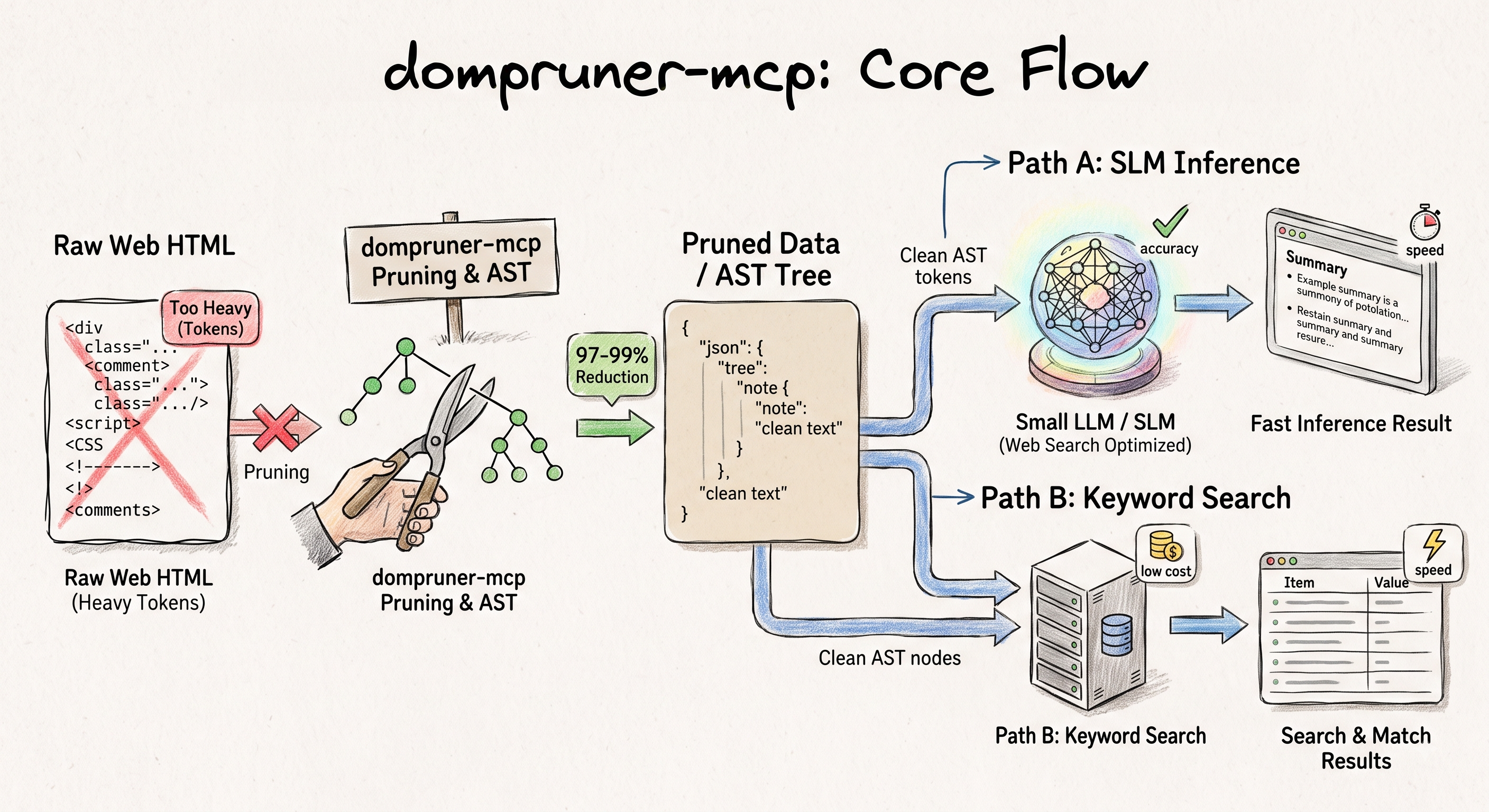
DOM AST middleware for LLM web pipelines — strips layout noise (nav, scripts, sidebars) and passes original text directly. Add a query to filter to relevant sections with BM25.
When an LLM uses the built-in WebFetch, a smaller model pre-processes the HTML and hands back a summarized result — adding latency, cost, and interpretation you didn't ask for. DomPruner skips that entirely: DOM AST parsing strips noise and passes the original content directly to the model.
| Call | Behavior |
|---|---|
dompruner_fetch(url) | Strips layout noise → returns full extracted content |
dompruner_fetch(url, query) | Strips layout noise → BM25 filters to relevant sections (falls back to full content if no match) |
> [DomPruner] docs.python.org
> | Raw HTML  | 44,316 tokens |
> | DomPruner |  1,328 tokens |
> | Reduction |        97.0%  |
> Fetch: 194ms · Parse: 11.2ms
93.5% fewer context tokens than WebFetch on average. 45% faster end-to-end. → Full benchmark
Quick Start
No installation, no API key:
npx -y dompruner-mcp
Claude Code
{
  "mcpServers": {
    "dompruner": {
      "type": "stdio",
      "command": "npx",
      "args": ["-y", "dompruner-mcp"]
    }
  }
}
Add to .mcp.json in your project root, or ~/.claude/.mcp.json for global. Run /mcp to verify.
Claude Desktop
Edit ~/Library/Application Support/Claude/claude_desktop_config.json (macOS) or %APPDATA%\Claude\claude_desktop_config.json (Windows):
{
  "mcpServers": {
    "dompruner": {
      "command": "npx",
      "args": ["-y", "dompruner-mcp"]
    }
  }
}
Cursor / Windsurf / other MCP clients
{
  "mcpServers": {
    "dompruner": {
      "type": "stdio",
      "command": "npx",
      "args": ["-y", "dompruner-mcp"]
    }
  }
}
Remote HTTP (no install, always up to date)
For clients that support HTTP transport — no Node.js install required, always runs the latest version:
{
  "mcpServers": {
    "dompruner": {
      "url": "https://dompruner-mcp.vercel.app/api/mcp"
    }
  }
}
LangChain / LangGraph
langchain-mcp-adapters wraps any MCP stdio server as LangChain tools automatically:
from langchain_mcp_adapters.client import MultiServerMCPClient

client = MultiServerMCPClient({
    "dompruner": {
        "command": "npx",
        "args": ["-y", "dompruner-mcp"],
        "transport": "stdio",
    }
})
tools = await client.get_tools()
Ensuring Your AI Always Uses DomPruner
DomPruner's tool description already tells clients to prefer dompruner_fetch over WebFetch. If your client still falls back, add this to its instruction file:
When retrieving a URL, always use dompruner_fetch instead of WebFetch.
- URL known → dompruner_fetch(url, query?)
- URL unknown → search for the URL first, then dompruner_fetch(url)
| Client | Instruction file |
|---|---|
| Claude Code | CLAUDE.md (project) or ~/.claude/CLAUDE.md (global) |
| Cursor | .cursorrules |
| Windsurf | .windsurfrules |
| Cline | .clinerules |
| GitHub Copilot | .github/copilot-instructions.md |
Tools
| Tool | Description |
|---|---|
dompruner_fetch | Fetch a URL → DOM-refined Markdown. Optional query enables BM25+ section filtering. |
dompruner_sitemap | Fetch all pages in a sitemap.xml → one refined Document per page. |
dompruner_analyze | Token-reduction report for a URL without full content. |
Benchmark Summary
| Metric | WebFetch | DomPruner |
|---|---|---|
| Avg context tokens | ~15,735 | ~1,019 (93.5% less) |
| Answer quality (10 queries) | 9 / 10 | 8 / 10 |
| Avg response time | 5,811 ms | 3,168 ms (45% faster) |
| Content fidelity | Summarized by small model | Original text preserved |
| Extra API key / infra | No | No |
→ Full benchmark · Architecture
Related
- dompruner-py — Python port.
DomPrunerLoader,DomPrunerSitemapLoader,DomPrunerFetchToolfor LangChain.pip install dompruner. - LangChain integrations — dompruner-py listed as a third-party web loader.
Glama Score

License
MIT
Installation
Source-derived launch command. Check the maintainer’s required arguments and credentials before running:
npx -y dompruner-mcpSet up in your AI client
Merge this template into ~/Library/Application Support/Claude/claude_desktop_config.json. Keep existing servers. Add any arguments, credentials, and permissions required by the maintainer; this template has not been install-tested.
{
  "mcpServers": {
    "io-github-dong7812-dompruner-mcp": {
      "command": "npx",
      "args": [
        "-y",
        "dompruner-mcp"
      ]
    }
  }
}
Restart Claude Desktop completely for changes to take effect. Confirm the server appears connected in the client’s tool list, then try a read-only example from its documentation.
Claude Desktop setup referencePackage
dompruner-mcpnpmCompatible MCP Clients
dompruner-mcp works with any MCP-compatible client. Copy the config snippet from the Configuration section above and add it to the file shown for your client, then restart the application.
- Claude Desktop
~/Library/Application Support/Claude/claude_desktop_config.jsonRestart Claude Desktop completely for changes to take effect. - Cursor
~/.cursor/mcp.jsonRestart Cursor for changes to take effect. - VS Code
.vscode/mcp.jsonReload VS Code window for changes to take effect. - Windsurf
~/.codeium/windsurf/mcp_config.jsonRestart Windsurf for changes to take effect. - Claude Code
.mcp.jsonSave at the project root, then start Claude Code in that project and review the MCP server approval prompt. Keep real credentials out of shared files.