Yandex 360 (ycli)
Yandex 360 Tracker, Wiki and Forms: read and write tools with honest read-only annotations.
ycli
One Yandex 360 toolkit — four ways to use it. Drive Tracker, Wiki, and Forms from a CLI, an MCP server, a Python SDK, or a Claude Code plugin. Built for AI agents first — pleasant for humans too.
English · Русский








- 🧩 One SDK, four surfaces — write logic once, use it as a CLI, an MCP server, a Python library, or a Claude Code plugin.
- 🤖 Agent-native — the MCP server exposes read and write
tracker_*,wiki_*,forms_*tools, one per SDK/CLI operation, plus a cross-cuttingstatustool (counts in Coverage), with honest annotations (reads are marked read-only; writes declare whether they are destructive/idempotent);ycli mcp start --read-onlyserves a reads-only view for cautious deployments, and--toolsets coreserves a curated everyday profile when a host limits how many tools it accepts. - 🛡️ Trustworthy — typed pydantic models, the real Yandex API quirks handled for you, and a test suite kept at 100% coverage.
- ⚡ Zero-friction start —
uv add yandex-cli,ycli auth login, go.
The full documentation (tutorial, how-to guides, the CLI, MCP and SDK reference) is at bim-ba.github.io/ycli.
Install
uv add yandex-cli            # CLI + Python SDK
uv add 'yandex-cli[mcp]'     # …plus the MCP server (`ycli mcp start`)
Run it without installing, or install it as a standalone tool:
uvx yandex-cli --help                 # one-off, no install
uv tool install yandex-cli            # persistent CLI
uv tool install 'yandex-cli[mcp]'     # …with the MCP server
pip install yandex-cli works too. The CLI ships as both yandex-cli and the short ycli.
Using an AI harness (Claude Code, Claude Desktop, Cursor, VS Code, Codex, Gemini CLI, opencode, Docker)? See Install in your harness.
The SDK's ServiceAccountAuth (IAM tokens minted from a Yandex Cloud service-account key) needs
the service-account extra: uv add 'yandex-cli[service-account]'.
Quick start
Pick the surface that fits how you work.
CLI
uv add yandex-cli
ycli --help
ycli tracker issues get TRACKER-1
ycli wiki pages get onboarding
Output formats — a global --format / -o picks how results print (the global options work before or after the subcommand: ycli -o json tracker issues get K = ycli tracker issues get K -o json; a command that declares an option of its own, like forms answers export --format, keeps it):
ycli tracker issues get TRACKER-1            # auto: a pretty table on a TTY…
ycli tracker issues get TRACKER-1 | jq .     # …and raw JSON when piped (agent/script-safe)
ycli -o yaml wiki pages get onboarding       # or: -o json | -o yaml | -o pretty
ycli --jq .summary tracker issues get TRACKER-1   # filter the JSON with jq; a string prints bare
--jq EXPR runs a jq program over the command's JSON result and prints
like jq -r: a string comes out raw, anything else as one compact JSON value per line. It
cannot be combined with -o yaml / -o pretty, and it needs the jq Python package (a
dependency; it has no build for Windows on ARM).
Deleting asks first. A command that destroys data (every delete, clear, abort…) asks
DELETE <url> — this deletes data. Continue? on stderr when you are at a terminal, and exits 1
if you decline. In a script, a pipe or CI there is no one to ask, so it fails with exit 2 until
you pass --yes / -y: ycli tracker boards delete 7 --yes. Reads and ordinary writes never ask.
Preview a write. --dry-run sends nothing for any write: it prints the request instead
(method, URL, body; never your token), through the same -o / --jq output, and exits 0.
Reads still run, so a command that reads and then writes shows its first write only:
ycli tracker boards delete 7 --dry-run. (The two commands that ask the API itself to validate
a request, forms filling submit and wiki pages move, call that --validate-only.)
An endpoint ycli has not wrapped. ycli api PATH --service tracker|wiki|forms calls it like
gh api would, with the same auth, retries, output and exit codes:
ycli api issues/TRACKER-1 --service tracker --jq .summary           # GET (the default method)
ycli api issues/TRACKER-1/comments --service tracker -F text=@note.md   # POST: a field turns it into one
ycli api pages/descendants --service wiki -f slug=docs --paginate   # every page, as one JSON array
PATH is relative to the service's base URL; a full URL of a service needs no --service, and
any other host is refused (your token never goes elsewhere). -f key=value is a string, -F is
typed (true, null, numbers, JSON, @file for a file's text, key[sub]=v to nest, key[]=v
for an array); fields of a GET or DELETE go to the query string, otherwise to a JSON body (--input FILE sends a raw body instead). -H 'Name: value' adds a header, -X sets the method, and
--dry-run, --yes and --jq behave as everywhere. --paginate follows Tracker's Link: rel="next"
and Wiki's next_cursor; Forms pages its listings in more than one way, so pass its paging
parameters with -f yourself.
MCP server (read/write)
Run it over stdio (needs the mcp extra):
ycli mcp start               # full read/write tool set (honest annotations)
ycli mcp start --read-only   # reads-only view for cautious deployments
Serving every tool costs a large tools/list and some hosts cap a request (VS Code allows
128 tools), so pick what the session needs:
| Flag | Serves |
|---|---|
--toolsets tracker,wiki | only those services (tracker, wiki, forms); default all |
--toolsets core | a curated everyday profile of about 40 tools (issues, comments, transitions, worklog, wiki pages and search, form reads) |
--tools a,b / --exclude-tools a,b | add or hide single tools by name (unknown names fail at start) |
--read-only | no write tools; always wins over the flags above |
--tool-search | lists a search tool and a call proxy instead of the tools; use it with a large set |
status_get is always served. The listing omits output schemas and doctest examples (results
still carry structuredContent), which cuts tools/list from about 1.9 MB to about 0.5 MB for
the full set.
For several users, serve it over HTTP: each MCP client signs its user in through Yandex ID (OAuth), and every tool call runs with that user's own Yandex token. Setup, including the Yandex OAuth app and the reverse proxy, is in Self-host over HTTP.
ycli mcp start --transport http --toolsets core # needs YCLI__MCP__BASE_URL and an OAuth app
List the tool names a given set of flags exposes without running the server:
ycli mcp methods --toolsets core --read-only
Point an MCP client at it — no prior install needed via uvx (tools are namespaced
tracker_*, wiki_*, forms_*):
{
  "mcpServers": {
    "yandex": {
      "command": "uvx",
      "args": ["--from", "yandex-cli[mcp]", "ycli", "mcp", "start"],
      "env": {
        "YANDEX_ID_OAUTH_TOKEN": "...",
        "YANDEX_ID_ORGANIZATION_ID": "..."
      }
    }
  }
}
Python SDK
from ycli.yandex.tracker.client import TrackerClient

tracker = TrackerClient(oauth_token="…", organization_id="…")
issue = tracker.issues.get("TRACKER-1")
print(issue.summary)
Claude Code plugin
/plugin marketplace add bim-ba/ycli
/plugin install yandex-360@ycli
Teaches an agent to drive Yandex 360 through ycli — including the real API quirks.
See plugins/yandex-360/.
Skills (Claude Code plugin)
| Skill | Use for |
|---|---|
yandex-360 | Entry point — install + auth, pick a surface (CLI/MCP/SDK), route to a domain |
yandex-360-tracker | Issues, epics, comments, transitions, links, worklog, changelog |
yandex-360-wiki | Wiki pages, page tree, comments, attachments, YFM authoring |
yandex-360-forms | Forms, questions/schema, responses, publishing |
The skills encode the read/write commands and the gnarly Yandex API quirks
(epic-vs-parent, transition discovery, permanent wiki slugs, fields= rules, Forms
host/header traps, answers pagination).
Configure
ycli reads two values from the environment (or a .env file — cp .env.example .env):
YANDEX_ID_OAUTH_TOKEN=...        # a Yandex OAuth token with Tracker/Wiki/Forms access
YANDEX_ID_ORGANIZATION_ID=...    # your Yandex 360 organization id
ycli sends the org id as X-Org-Id for every service (HTTP header names are case-insensitive
per RFC 9110, so one casing serves all).
Optional settings follow the YCLI__<GROUP>__<SETTING> pattern; ycli rejects an invalid value
at startup and names the variable:
| Variable | Default | Meaning |
|---|---|---|
YCLI__HTTP__TIMEOUT_SECONDS | 30 | Per-request timeout, seconds (> 0) |
YCLI__HTTP__RETRIES | 3 | Retries for idempotent requests on 429/5xx (≥ 0) |
YCLI__HTTP__MAX_ITEMS | 500 | Item cap for listings without --limit/--all (> 0) |
YCLI__LOGGING__LEVEL | WARNING | DEBUG, INFO, WARNING, ERROR or CRITICAL; -v means INFO (every HTTP request), -vv means DEBUG |
YCLI__LOGGING__FORMAT | text | text or json (one object per line); logs always go to stderr |
Get your credentials
Yandex issues OAuth tokens only through a registered application, so it's a one-time app registration plus one command.
1. Register an OAuth app at oauth.yandex.ru and
grant it the Tracker, Wiki, and Forms permissions (read and write — the
CLI and the MCP server both write; the read scopes alone suffice only if you run the MCP
server with ycli mcp start --read-only). Put the ClientID — and the Client secret
if you want the headless flow — in your .env (ycli reads it from there):
YANDEX_OAUTH_CLIENT_ID=...        # from your app
YANDEX_OAUTH_CLIENT_SECRET=...    # optional — enables the headless device flow
2. Log in. ycli auth login gets a token, detects your organization, and writes both
into .env:
ycli auth login
- client id + secret → the device flow: ycli prints a code and a
https://ya.ru/devicelink; approve there and it captures the token — no redirect, works over SSH. - only the client id (or
--implicit) → the browser flow: ycli opens the Yandex authorize page; approve, then copy the token it displays and paste it back.
Check it any time with ycli auth status: it shows whose token it is (from Yandex ID), your
organization (its name needs the optional directory:read_organization scope; without it you
get the id and a note) and whether each service accepts the token. ycli tracker auth status
(or wiki, forms) probes just that one service. Both exit non-zero when a service rejects
the token.
Prefer to do it by hand?
Headless (device flow):
# 1. start the flow — returns a user_code + verification_url
curl -s -X POST https://oauth.yandex.ru/device/code -d "client_id=$YANDEX_OAUTH_CLIENT_ID"
# 2. open https://ya.ru/device, enter the user_code, approve
# 3. exchange the device_code for the token
curl -s -X POST https://oauth.yandex.ru/token \
  -d grant_type=device_code -d "code=<device_code>" \
  -d "client_id=$YANDEX_OAUTH_CLIENT_ID" -d "client_secret=$YANDEX_OAUTH_CLIENT_SECRET"
Browser (implicit): open
https://oauth.yandex.ru/authorize?response_type=token&client_id=<ClientID> in a logged-in
browser, approve, and copy the token from the page. (Plain curl can't — implicit needs an
interactive browser session.)
Organization id: tracker.yandex.ru/admin/orgs → your organization → copy the identifier.
The Yandex documentation behind each step:
| Step | Yandex docs |
|---|---|
| Register the OAuth app | Registering an app (Yandex ID) |
Device flow (ycli auth login with a secret) | Entering the code on the authorization page |
Browser flow (--implicit) | Obtain a token manually |
| Token and organization header per service | Tracker · Wiki · Forms API access |
Exit codes
A failed ycli command exits with a code that says what kind of failure it was, so a script can branch without parsing the message.
| Code | Meaning | When |
|---|---|---|
| 0 | ok | the command succeeded |
| 1 | failure | any other failure: a 4xx the API rejected, an unmapped error, a declined confirmation |
| 2 | usage | a bad command line or an invalid YCLI__… setting |
| 3 | not found | the API answered 404 (or the token cannot see the object) |
| 4 | auth | 401 / 403, or no credentials set |
| 5 | rate limited | the API answered 429 and the retries ran out (the hint shows Retry-After) |
| 6 | transient | a 5xx, a timeout or a lost connection: worth retrying later |
Coverage
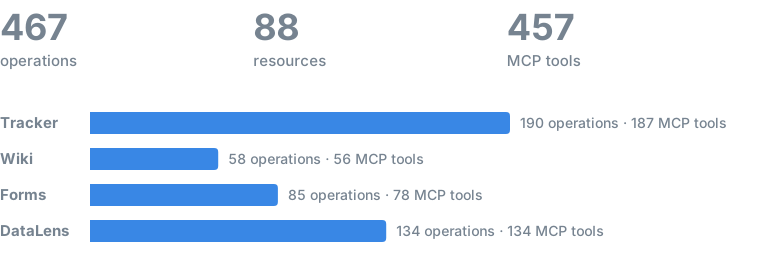
ycli wraps 334 operations across 62 resources of the Tracker, Wiki, and Forms REST API. Every one is reachable from the Python SDK and the CLI, and 322 MCP tools serve them to agents (321 per service plus status_get).
Legend. ✅ in CLI or MCP means the resource is reachable on that surface; MCP tools carry honest hints (reads are
readOnlyHint, writes say whether they are destructive or idempotent), andycli mcp start --read-onlyserves only the reads. Resource and operation names link to the official Yandex API reference. A ✅ says ycli wraps the operation; where it differs from what Yandex publishes is listed under Against the published API. Generated from the code byscripts/gen_coverage.py; do not edit by hand.
Tracker
35 resources · 190 operations · 187 MCP tools
Issues & work items
| Resource | Operations | CLI | MCP |
|---|---|---|---|
| issues | get · search · count · create · update · move · suggest · scroll_clear | ✅ | ✅ |
| comments | list · get · add · edit · delete · react | ✅ | ✅ |
| links | list · search · add · delete | ✅ | ✅ |
| transitions | list · execute | ✅ | ✅ |
| worklog | list · search · global_list · create · edit · delete | ✅ | ✅ |
| changelog | list | ✅ | ✅ |
| checklists | get · create · edit · delete · clear | ✅ | ✅ |
| attachments | list · download · download_thumbnail · get · delete · upload · upload_temp | ✅ | ✅ |
| remotelinks | list · create · delete | ✅ | ✅ |
Agile boards
| Resource | Operations | CLI | MCP |
|---|---|---|---|
| boards | list · get · create · edit · delete | ✅ | ✅ |
| sprints | list · get · create · edit · delete · start · archive | ✅ | ✅ |
| columns | list · get · create · edit · delete | ✅ | ✅ |
Dictionaries
| Resource | Operations | CLI | MCP |
|---|---|---|---|
| priorities | list · create · edit | ✅ | ✅ |
| statuses | list · create · edit | ✅ | ✅ |
| resolutions | list · create · edit | ✅ | ✅ |
| issuetypes | list · create · edit | ✅ | ✅ |
| linktypes | list | ✅ | ✅ |
Fields, queues & structure
| Resource | Operations | CLI | MCP |
|---|---|---|---|
| fields | list · get · create · edit · category_create · category_edit | ✅ | ✅ |
| localfields | list · get · create · edit | ✅ | ✅ |
| components | list · create · edit · list_for_queue · get · delete · user_permissions · group_permissions | ✅ | ✅ |
| queues | list · get · tags · versions · fields · create · delete · restore · set_permissions · tag_remove · version_create · version_get · version_edit · version_delete · user_permissions · group_permissions | ✅ | ✅ |
| workflows | list · get · for_queue · create · edit · edit_action · delete | ✅ | ✅ |
| projects | list · get · queues · create · edit · delete | ✅ | ✅ |
Automation & bulk
| Resource | Operations | CLI | MCP |
|---|---|---|---|
| macros | list · get · create · edit · delete | ✅ | ✅ |
| triggers | list · get · create · edit · webhook_log | ✅ | ✅ |
| autoactions | get · create · logs · log_detail | ✅ | ✅ |
| dashboards | create · add_cycle_time_widget | ✅ | ✅ |
| bulk | update · move · transition · get · issues | ✅ | ✅ |
| import | task · comment · link · worklog · file · comment_file | ✅ | ✅ |
Entities, users & search
| Resource | Operations | CLI | MCP |
|---|---|---|---|
| entities | create · get · edit · delete · search · history · permissions · set_permissions · direct_permissions · set_direct_permissions · bulk_update · bulk_status · create_report · comments_list · comments_relative · comments_get · comments_create · comments_edit · comments_delete · checklists_create · checklists_edit · checklists_edit_item · checklists_delete · checklists_delete_item · checklists_move · links_list · links_create · links_delete · attachments_list · attachments_get · attachment_download · attachments_attach · attachments_delete | ✅ | ✅ |
| users | get · list | ✅ | ✅ |
| applications | list | ✅ | ✅ |
| filters | get · create · edit · delete | ✅ | ✅ |
| gaps | create · search · delete | ✅ | ✅ |
| me | get | ✅ | ✅ |
Wiki
11 resources · 58 operations · 56 MCP tools
Pages
| Resource | Operations | CLI | MCP |
|---|---|---|---|
| pages | get_by_id · get · descendants · descendants_by_id · grids · create · update · delete · append_content · clone · move · revisions · backlinks | ✅ | ✅ |
| resources | list | ✅ | ✅ |
| recovery | restore | ✅ | ✅ |
| search | query | ✅ | ✅ |
Collaboration
| Resource | Operations | CLI | MCP |
|---|---|---|---|
| comments | list · thread · thread_get · create · delete | ✅ | ✅ |
| attachments | list · get · preview · download · download_by_url · delete · attach · upload | ✅ | ✅ |
| access | create · update · delete · clear | ✅ | ✅ |
Grids (dynamic tables)
| Resource | Operations | CLI | MCP |
|---|---|---|---|
| grids | get · create · update · delete · add_rows · remove_rows · move_rows · add_columns · remove_columns · move_columns · update_cells · clone · suggest_column · update_column · update_row | ✅ | ✅ |
Async & uploads
| Resource | Operations | CLI | MCP |
|---|---|---|---|
| operations | clone_get · gridclone_get · move_get | ✅ | ✅ |
| uploadsessions | create · get · upload_part · finish · abort · abort_all | ✅ | ✅ |
Identity
| Resource | Operations | CLI | MCP |
|---|---|---|---|
| me | get | ✅ | ✅ |
Forms
16 resources · 86 operations · 78 MCP tools
Surveys & questions
| Resource | Operations | CLI | MCP |
|---|---|---|---|
| surveys | list · get · create · modify · delete · publish · unpublish | ✅ | ✅ |
| questions | get · list · create · modify · delete · move | ✅ | ✅ |
| conditions | question_list · question_get · question_create · question_modify · question_delete · question_set_operator · page_list · page_get · page_create · page_modify · page_delete · page_set_operator · submit_list · submit_get · submit_create · submit_modify · submit_delete · submit_set_operator · hook_list · hook_get · hook_create · hook_modify · hook_delete · hook_set_operator | ✅ | ✅ |
| access | get · set · grant · revoke | ✅ | ✅ |
| history | list | ✅ | ✅ |
Responses & export
| Resource | Operations | CLI | MCP |
|---|---|---|---|
| answers | get · list · list_all · export · export_results · download_export · integrations_list · delete · restore | ✅ | ✅ |
| operations | get | ✅ | ✅ |
Integrations
| Resource | Operations | CLI | MCP |
|---|---|---|---|
| hooks | list · get · [create](https://yandex.ru/support/forms/en/api-ref/groups/events_b2b_v1_views_hooks_create_hook_pub |
Installation
Source-derived launch command. Check the maintainer’s required arguments and credentials before running:
uvx yandex-cliSet up in your AI client
Merge this template into ~/Library/Application Support/Claude/claude_desktop_config.json. Keep existing servers. Add any arguments, credentials, and permissions required by the maintainer; this template has not been install-tested.
{
  "mcpServers": {
    "io-github-bim-ba-ycli": {
      "command": "uvx",
      "args": [
        "yandex-cli"
      ]
    }
  }
}
Restart Claude Desktop completely for changes to take effect. Confirm the server appears connected in the client’s tool list, then try a read-only example from its documentation.
Claude Desktop setup referencePackage
yandex-clipypiCompatible MCP Clients
Yandex 360 (ycli) works with any MCP-compatible client. Copy the config snippet from the Configuration section above and add it to the file shown for your client, then restart the application.
- Claude Desktop
~/Library/Application Support/Claude/claude_desktop_config.jsonRestart Claude Desktop completely for changes to take effect. - Cursor
~/.cursor/mcp.jsonRestart Cursor for changes to take effect. - VS Code
.vscode/mcp.jsonReload VS Code window for changes to take effect. - Windsurf
~/.codeium/windsurf/mcp_config.jsonRestart Windsurf for changes to take effect. - Claude Code
.mcp.jsonSave at the project root, then start Claude Code in that project and review the MCP server approval prompt. Keep real credentials out of shared files.