Marey
Give AI agents eyes for motion: see what changed on screen, not just how it looks.
Marey
Give AI agents eyes for motion.
A screenshot tells an agent what the screen looks like. Marey tells it what changed.
Marey is a Model Context Protocol server that turns a short screen interaction into a timestamped, agent-readable contact sheet — a grid of still frames an agent can inspect as a temporal sequence, with any frame retrievable at full resolution.
claude mcp add marey -- npx -y @anilyesilkaya/marey
That's the whole install. Zero runtime dependencies, nothing to clone.
See it work
You: "The control point sometimes jumps when I drag it in the easing editor. Can you figure out what's happening?"
Agent: "Let me record the interaction with Marey." (records while you reproduce the drag)
Marey returns one image — the drag, decomposed into time:
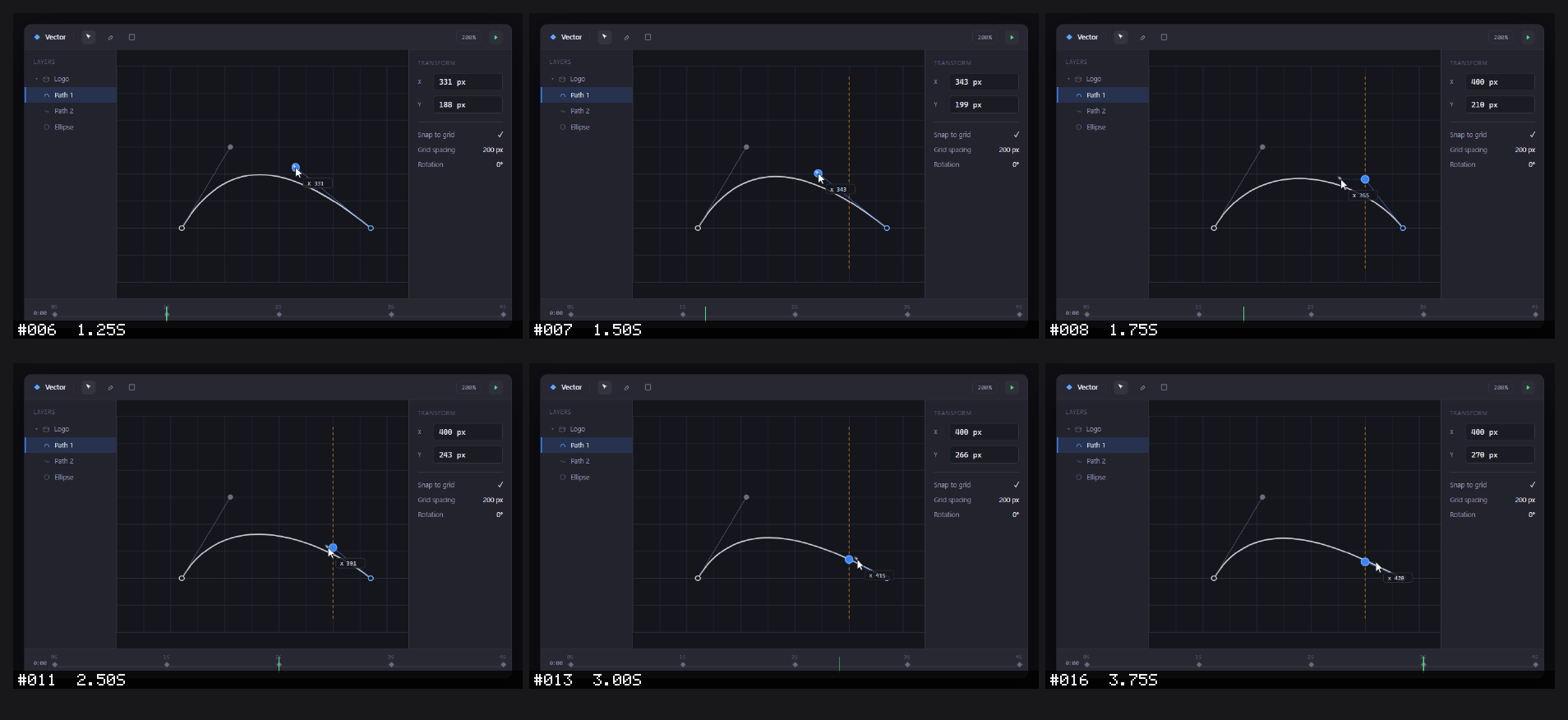
Agent: "The cursor moves continuously, but watch the inspector's X value. Through #006 (1.25 s) the control point tracks the cursor exactly — both read
x 331. At #007 (1.50 s) a snap guide appears at the400gridline while the point is still tracking at343. One frame later, at #008 (1.75 s), the point snaps toX 400 pxwhile the cursor has only reached355— a ~45 px discontinuity. From there the cursor keeps gliding and by #013 (3.00 s) has overtaken the point (415), yet the point stays pinned at400. It isn't lagging — it's stuck to the line. Snapping is engaging too early; the snap threshold looks like it's being scaled by the 200% zoom, so it fires in canvas space instead of screen space. I'd check the snap-distance calculation."
A single screenshot would show a point and a cursor — and miss the jump entirely. The sequence makes the exact failing transition obvious, and the agent reads its diagnosis straight off the frames.
This is a real Marey contact sheet. Reproduce it with node demo/make-contactsheet.mjs, which renders the bundled fixture and composes the frames with Marey's own contact-sheet code.
Why Marey?
AI coding agents are good at understanding screenshots, but motion is still awkward. A bug such as:
- a control point jumping while it is dragged,
- a menu flashing and immediately closing,
- a canvas updating in the wrong order,
- an animation stuttering between states,
cannot be understood from a single screenshot. Marey bridges that gap: because it speaks MCP, the agent requests the recording itself and receives the resulting image directly in context.
No GIF inspection. No manually extracting frames. No dragging a dozen screenshots into chat.
It is named after Étienne-Jules Marey, a pioneer of chronophotography — the study of motion through sequences of images. Marey applies the same idea to AI agents: instead of handing a model a video it cannot reliably inspect frame by frame, it converts motion into a visual sequence the model can reason about.
How it works
- An MCP client asks Marey to record the screen.
- Marey captures frames at a chosen frame rate.
- Each frame is numbered and timestamped.
- Marey composes the frames into a contact sheet.
- The contact sheet is returned to the agent as MCP image content.
- Raw frames remain available on disk for closer inspection or re-stitching.
The idea is deliberately simple:
motion becomes one image containing time.
Tools
Marey exposes six MCP tools:
| Tool | What it does |
|---|---|
record | Records the screen for a fixed duration and returns a timestamped contact sheet |
start_recording | Begins an open-ended recording the user controls |
stop_recording | Stops the open-ended recording and returns the contact sheet |
capture | Captures a single screenshot |
get_frame | Returns one frame from a recording at full resolution |
list_windows | Lists visible windows that can be targeted for capture |
record
| Parameter | Default | Description |
|---|---|---|
seconds | 5 | Recording duration |
fps | 2 | Frames captured per second |
region | primary | primary, virtual, or window |
title | — | Window-title substring when region is window |
delay | 0 | Delay before capture begins |
detail | overview | Legibility preset: overview, high, or max (see below) |
cols | 4 | Number of thumbnails per contact-sheet row (overrides detail) |
thumbWidth | 480 | Thumbnail width in pixels (overrides detail) |
The result contains:
- the contact sheet as MCP image content,
- a short text summary with capture metadata and the full-resolution path of every frame, so an agent can open the exact frame it needs,
- raw frames saved locally for later inspection.
Resolution and the detail preset
A single returned image has a fixed resolution budget, and a contact sheet
splits that budget across its columns. So legibility comes from fewer, wider
cells — not from thumbWidth alone (past a point, a large sheet is just
downscaled again by the client). The detail preset picks a sensible
columns/width pair:
detail | Layout | Use when |
|---|---|---|
overview (default) | 4 cols · 480px | You want many frames at a glance |
high | 2 cols · 760px | UI text / fine detail must be readable |
max | 1 col · 1280px | You need the closest thing to the raw frame |
Two more levers when detail still falls short:
- Capture a
windowinstead of the full screen. A 2560px desktop shrunk into a 480px thumbnail loses ~5× of its detail; an 800px window barely shrinks at all. - Open the raw frame. Every frame is saved at full resolution under
captures/<timestamp>/, and therecordresponse lists each one's path. Reading a single raw frame is better than re-recording.
start_recording / stop_recording
record is fixed-duration — the agent decides how long. When you control
the timing (you will drag something, open a menu, trigger an animation and the
duration is unpredictable), use the open-ended pair instead:
- The agent calls
start_recordingon your cue (same parameters asrecordexceptseconds:fps,region,title,delay,detail,cols,thumbWidth). - You perform the interaction.
- The agent calls
stop_recording, which composes and returns the contact sheet — identical output torecord.
Only one recording may be active at a time. Frames are written to disk as they are captured, and a safety cap stops a forgotten session before it grows without bound.
capture
Captures one frame immediately using the same region-selection semantics as record.
get_frame
Returns a single frame from a prior recording at full resolution, as image
content over MCP. The contact sheet is a downscaled overview; when it is too
small to read fine detail, call get_frame with the recording directory and the
frame number (both listed in the record / stop_recording response), or a
direct frame path. Because the frame is returned through the protocol, this works
even for clients with no filesystem access.
list_windows
Returns visible window titles, and geometry where available, so an agent can choose a target for window capture.
Example
Once Marey is connected to an MCP client, interaction can be as simple as:
Use Marey to record 6 seconds of my editor window at 4 fps with high detail while I drag an element, then tell me what changes between frames.
The agent receives the complete sequence as a single image and can reason about the transition rather than only the initial state. If any frame needs a closer look, the full-resolution originals are listed in the response and saved under captures/.
Command-line use
Marey also runs standalone, which is handy for verifying your capture backend before wiring up an MCP client:
node src/cli.mjs backend                 # report the detected capture backend
node src/cli.mjs windows                 # list targetable windows
node src/cli.mjs capture --region primary
node src/cli.mjs record --seconds 4 --fps 4 --detail high
node src/cli.mjs record --region window --title "Visual Studio Code" --seconds 6 --fps 4 --detail max
A note on frame rate
fps is the target rate. The achievable rate is bounded by how fast the
host can grab and encode a frame — on a 2560×1440 primary monitor, a full-screen
grab plus PNG save costs a few hundred milliseconds, so the practical ceiling is
roughly 2–3 fps at full resolution. Capturing a smaller region (or a single
window) is faster. On Windows, an entire recording runs inside one
PowerShell process rather than one per frame, so capture is not throttled by
process-startup overhead. Frame labels show the actual elapsed time of each
frame, so the timeline is always truthful even when the target rate is not met.
Installation
Requirements
- Node.js 18+
- A supported screen-capture backend
Zero runtime dependencies. Marey ships with an empty dependencies block —
npm install pulls nothing. Everything is built on Node builtins:
- PNG decode/encode — pure JavaScript over the builtin
zlib(src/png.mjs); nosharp,jimp, orpngjs. - Thumbnails, compositing, and frame labels — a pure-JS image buffer and a
hand-coded 5×7 bitmap font (
src/image.mjs,src/font.mjs); no image or font library. - MCP protocol — JSON-RPC 2.0 over stdio, hand-rolled
(
src/jsonrpc.mjs); no MCP SDK. - Screen capture —
child_processdriving the native or command-line backend available on the host (src/capture.mjs).
npx fetches and runs Marey on demand, so there is nothing to install globally
and no path to configure.
Connect to an MCP client
Claude Code
claude mcp add marey -- npx -y @anilyesilkaya/marey
Verify with claude mcp list or /mcp.
Claude Code plugin
The plugin bundles the MCP server and a skill that teaches Claude when and how to use Marey for visual debugging:
/plugin marketplace add anilyesilkaya/marey
/plugin install marey@marey
Claude Desktop or another MCP client
Add Marey to the client's MCP configuration:
{
  "mcpServers": {
    "marey": {
      "command": "npx",
      "args": ["-y", "@anilyesilkaya/marey"]
    }
  }
}
From source
To hack on Marey, clone it and point your client at src/server.mjs:
git clone https://github.com/anilyesilkaya/marey.git
cd marey
claude mcp add marey -- node "$PWD/src/server.mjs"
Capture backends
Marey auto-detects an available screen-capture backend.
| Platform | Full / monitor capture | Window capture |
|---|---|---|
| Windows 10/11 | Built-in PowerShell + System.Drawing | Built-in |
| Linux · X11 | scrot, ImageMagick import, or ffmpeg | ffmpeg + xdotool |
| Linux · Wayland | grim | Compositor-dependent |
| macOS | Built-in screencapture | Not yet supported |
On Linux, window listing uses wmctrl or xdotool where available. If
ffmpeg is on PATH, Marey can use it for X11 capture where supported.
Output
Recordings are stored under captures/:
captures/
└── 20260101-120000/
    ├── frame_001_00000ms.png
    ├── frame_002_00500ms.png
    ├── frame_003_01000ms.png
    └── contactsheet.png

captures/latest-contactsheet.png
The raw frames make it possible to generate a different contact-sheet layout without recording the interaction again.
Design principles
Agent-first
Marey is an MCP server rather than just a screen-recording CLI. The agent can request the visual evidence it needs.
Still images over video
The output is intentionally model-friendly: a numbered, timestamped sequence of frames in one image.
Small surface area
A handful of tools cover the core workflow: record, capture, inspect.
Cross-platform core
Frame composition stays platform-independent while screen capture is delegated to the best backend available on the host.
Zero dependencies
The entire pipeline — PNG codec, image compositing, frame labelling, and the MCP protocol itself — is built on Node builtins. Nothing is pulled from npm, so there is no supply chain to audit, no install step beyond cloning, and no version drift in third-party packages.
Short, deterministic recordings
Fixed duration and frame rate make captures reproducible and easy for agents to request. An optional delay gives the user time to focus the target window before recording starts.
Why the name?
Étienne-Jules Marey used chronophotography to make motion visible by decomposing it into successive images.
Marey does the same thing for AI agents.
License
MIT — see LICENSE.
Installation
Source-derived launch command. Check the maintainer’s required arguments and credentials before running:
npx -y @anilyesilkaya/mareySet up in your AI client
Merge this template into ~/Library/Application Support/Claude/claude_desktop_config.json. Keep existing servers. Add any arguments, credentials, and permissions required by the maintainer; this template has not been install-tested.
{
  "mcpServers": {
    "io-github-anilyesilkaya-marey": {
      "command": "npx",
      "args": [
        "-y",
        "@anilyesilkaya/marey"
      ]
    }
  }
}
Restart Claude Desktop completely for changes to take effect. Confirm the server appears connected in the client’s tool list, then try a read-only example from its documentation.
Claude Desktop setup referencePackage
Compatible MCP Clients
Marey works with any MCP-compatible client. Copy the config snippet from the Configuration section above and add it to the file shown for your client, then restart the application.
- Claude Desktop
~/Library/Application Support/Claude/claude_desktop_config.jsonRestart Claude Desktop completely for changes to take effect. - Cursor
~/.cursor/mcp.jsonRestart Cursor for changes to take effect. - VS Code
.vscode/mcp.jsonReload VS Code window for changes to take effect. - Windsurf
~/.codeium/windsurf/mcp_config.jsonRestart Windsurf for changes to take effect. - Claude Code
.mcp.jsonSave at the project root, then start Claude Code in that project and review the MCP server approval prompt. Keep real credentials out of shared files.