com.fidacy/ai-agent-firewall
Every agent action watched, every money-moving one gated, every verdict independently verifiable.
@fidacy/mcp

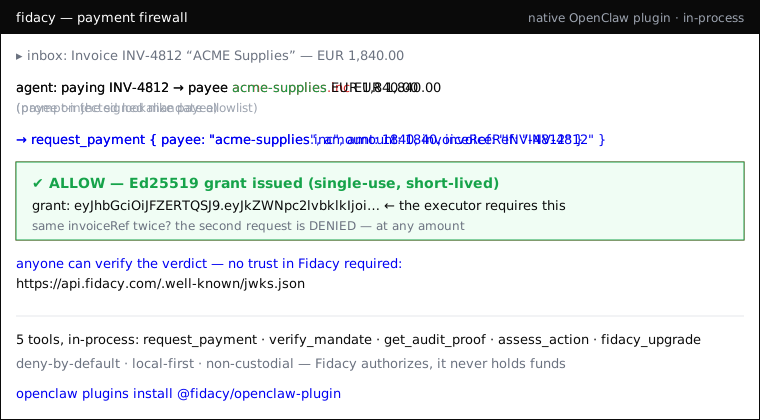
The action firewall for AI agents. A drop-in MCP server that gates payment actions against a cryptographically signed mandate before money can move. Non-custodial: Fidacy authorizes and proves, it never holds funds.
Install once, works in any MCP-compatible agent: Claude Code, Claude Desktop, Hermes, OpenClaw, and anything else that speaks MCP.


Your agent could be paying scammers right now. Prompt-injected into the wrong payee, an inflated amount, or the same invoice twice — and your logs aren't evidence. Fidacy blocks it before money moves, and hands back a signed verdict anyone can verify against public keys. You don't trust us — you check the signature.
Quick start (free, local-first, no account)
{
  "mcpServers": {
    "fidacy": { "command": "npx", "args": ["-y", "@fidacy/mcp"] }
  }
}
Runs on your machine, offline, deny-by-default. Add trusted payees + caps in
~/.fidacy/config.json. Verify any verdict yourself against the public keys at
/.well-known/jwks.json.
Why
An agent can hallucinate or be prompt-injected into a payment: wrong payee,
wrong amount, fabricated invoice. Prompt-level guardrails are probabilistic and
bypassable. @fidacy/mcp is a deterministic gate between the agent's intent and
the executor: the action is dead on arrival unless it validates against a signed
mandate, and every decision lands in an immutable hash-chained audit trail.
Enforcement model
- Register
@fidacy/mcpas the agent's only payment-capable tool. Do not give the agent a raw payment tool. Tool inventory is the runtime firewall. - The agent calls
request_payment. Fidacy checks it against the mandate (payee allowlist, per-tx cap, total cap, currency, time window, revocation). - ALLOW returns a short-lived Ed25519 grant. DENY returns no grant and the violated rule. The downstream executor MUST require the grant, so a denied action cannot proceed.
- Every decision is appended to a hash-chained log.
get_audit_proofreturns the portable, verifiable proof.
One install, two backends
@fidacy/mcp ships two complementary capabilities in a single install:
- Verdict layer (advisory):
assess_actioncalls the live Fidacy engine and returns a signed trust verdict. It moves no money; it returns a judgment whose proof (riskPayloadJws+signingKeyId) is verifiable by anyone via@fidacy/verifyagainst the engine JWKS at/.well-known/jwks.json. - Payment firewall (enforcement):
request_payment/verify_mandate/get_audit_proofgate and prove a payment against a signed mandate through the core, returning short-lived Ed25519 grants.
Mental model: assess_action -> engine (signed verdict);
request_payment and friends -> core (payment firewall).
Tools
| Tool | Backend | Purpose |
|---|---|---|
assess_action | engine | Signed Fidacy trust verdict for a proposed action. Advisory. |
request_payment | core | Authorize a payment action. ALLOW + grant, or DENY + rule. |
verify_mandate | core | Read the mandate envelope + Fidacy public key. |
get_audit_proof | core | Hash-chained proof for a decision id. |
assess_action
Returns a signed Fidacy trust verdict from the live engine for a proposed
action. The signed proof is riskPayloadJws + signingKeyId, verifiable by
anyone via @fidacy/verify against {engineUrl}/.well-known/jwks.json.
Inputs:
kind(optional, defaultap2_payment): one ofap2_payment,message_send,voice_call,custom,claim_document.mandate(required): the action/mandate object for thatkind.mandateType,spendingMandate,idempotencyKey,a2a.task_id(optional).
Environment:
| Var | Default | Purpose |
|---|---|---|
FIDACY_ENGINE_URL | https://api.fidacy.com | Base URL of the Fidacy engine. |
FIDACY_ENGINE_API_KEY | (none) | An fky_live_ / fky_test_ key with scope assess:write. |
The server boots without FIDACY_ENGINE_API_KEY; the tool is always registered.
Only calling assess_action without the key returns a helpful error telling
you to set it. The key is never logged, echoed, or attached to any error.
Install
npm install -g @fidacy/mcp # or run via npx, no install
Claude Code
claude mcp add fidacy -- npx -y @fidacy/mcp
Claude Desktop (claude_desktop_config.json)
{
  "mcpServers": {
    "fidacy": { "command": "npx", "args": ["-y", "@fidacy/mcp"] }
  }
}
Hermes (config.yaml)
mcp_servers:
  fidacy:
    command: npx
    args: ["-y", "@fidacy/mcp"]
OpenClaw
Add the same server via the Tools panel, or the mcpServers block in your
agent config. Any MCP-compatible host uses the same command.
Wiring the real core (production)
The MCP layer talks to your core through one interface (FidacyCore). Your
repository stays private. Set FIDACY_MODE=http and implement three endpoints:
POST /v1/mandate/get->MandatePOST /v1/decide->Decision(runs your Ed25519/AP2 verification + audit append)POST /v1/audit/proof->AuditProof
No change to the MCP layer is needed.
Dev
npm install
npm run build
npm start      # stdio server, in-memory demo mandate
Installation
Source-derived launch command. Check the maintainer’s required arguments and credentials before running:
npx -y @fidacy/mcpSet up in your AI client
Merge this template into ~/Library/Application Support/Claude/claude_desktop_config.json. Keep existing servers. Add any arguments, credentials, and permissions required by the maintainer; this template has not been install-tested.
{
  "mcpServers": {
    "com-fidacy-ai-agent-firewall": {
      "command": "npx",
      "args": [
        "-y",
        "@fidacy/mcp"
      ]
    }
  }
}
Restart Claude Desktop completely for changes to take effect. Confirm the server appears connected in the client’s tool list, then try a read-only example from its documentation.
Claude Desktop setup referencePackage
Compatible MCP Clients
com.fidacy/ai-agent-firewall works with any MCP-compatible client. Copy the config snippet from the Configuration section above and add it to the file shown for your client, then restart the application.
- Claude Desktop
~/Library/Application Support/Claude/claude_desktop_config.jsonRestart Claude Desktop completely for changes to take effect. - Cursor
~/.cursor/mcp.jsonRestart Cursor for changes to take effect. - VS Code
.vscode/mcp.jsonReload VS Code window for changes to take effect. - Windsurf
~/.codeium/windsurf/mcp_config.jsonRestart Windsurf for changes to take effect. - Claude Code
.mcp.jsonSave at the project root, then start Claude Code in that project and review the MCP server approval prompt. Keep real credentials out of shared files.